After spending a bit of time tidying up cables in my rack, I figured I’d take the opportunity to write about my current setup. Here it is in all its glory:
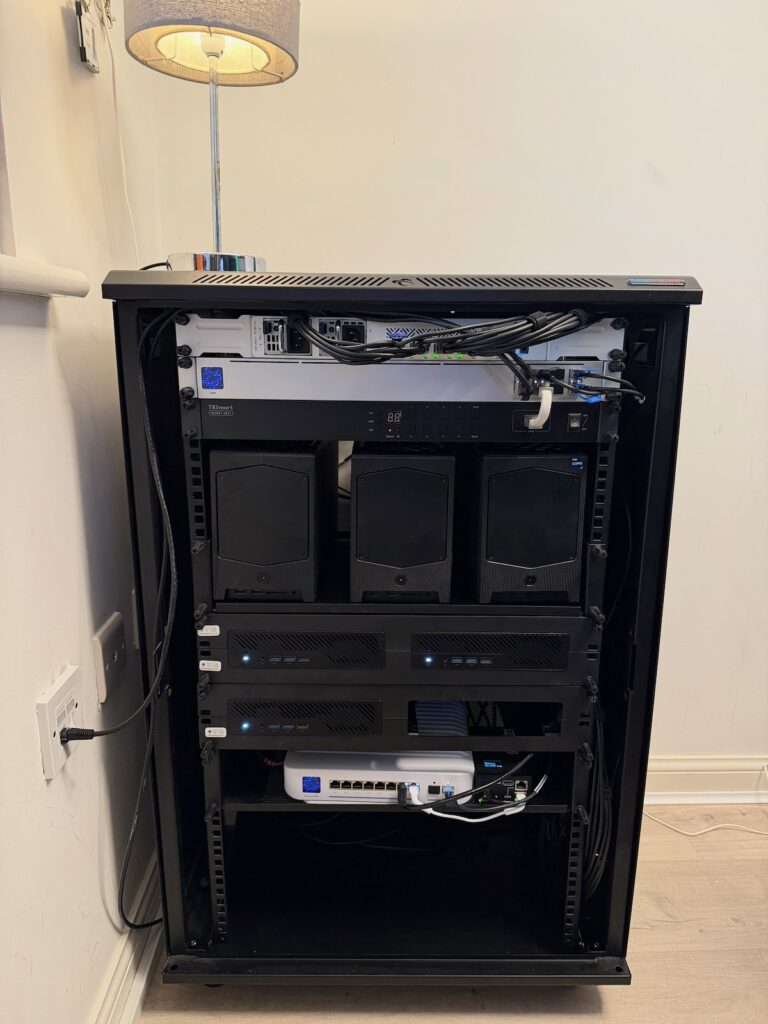
Not the greatest picture. From top to bottom:
- Mikrotik CRS504-4XQ-IN
- UniFi Switch Aggregation (USW-Aggregation)
- TESmart 8X1 KVM
- 3x Intel NUC11 Extreme:
- 1x i9-11900KB, 2x i7-11700B
- 64GB RAM
- WD SN770 1TB for NVMe memory tiering
- NFS storage presented from my Mac Studio
- ConnectX-4 dual port 25 GbE NIC
- 3x MS-A2
- 9955HX
- 96GB RAM
- Samsung PM983 1TB for NVMe memory tiering
- SN850X for vSAN ESA
- ConnectX-4 dual port 25 GbE NIC
- USW Enterprise 8 PoE
- PiKVM
- All powered using Tapo P304M so I can monitor power consumption, and remote start up/shut down the lab
Here’s a diagram of how it’s all connected together. Not in the diagram is a UniFi NAS which presents NFS for Content Library, as well as acting as a backup target for the VCF Fleet, plus Veeam backups. The NAS is not in the rack, and is connected to my home network elsewhere in the house.
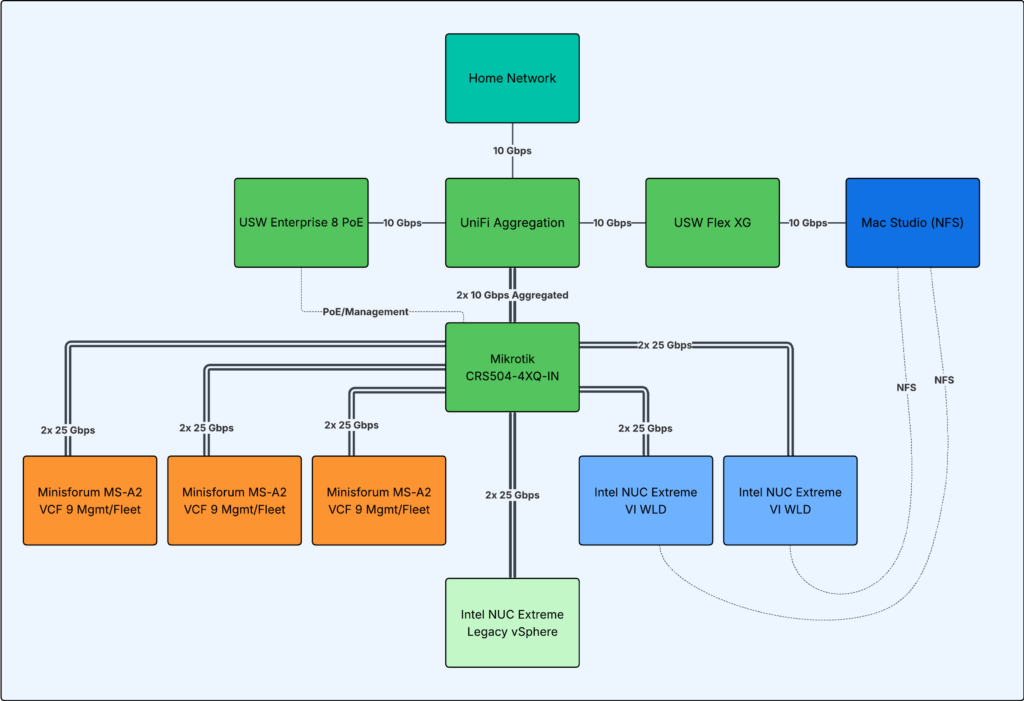
The link to my main network comes into the Aggregation switch, which then connects to a USW Flex XG in my office for personal devices (and a Mac Studio, more on that below). The Aggregation switch also has a downlink to the USW Enterprise 8 PoE which powers the CRS504, connects to the PiKVM, and acts as a quick access switch.
From the Mikrotik itself, I have 4x QSFP to SFP28 breakout cables connecting to all the hosts, plus 2 bonded to the Aggregation switch (2x 10 Gbps) leaving two spare SFP28 tails. I do plan on replacing the USW Flex XG, the Aggregation, and the PoE switch with a single unit at some point to tidy things up further. This setup gives all the hosts 2x25Gbps non-blocking bandwidth to each other, and the NUCs get 10 Gbps to the NFS storage and wider network (more on that below).
Host control wise I use a PiKVM, and this can send commands via IP to the TESmart KVM switch to change input. This KVM switch is nice and you can turn off the display, but the method of changing IP is awkward since it comes with a static IP from factory and you need software which only runs on Windows to be able to change it (I’m a Mac user!). Additionally, I cannot get the TESmart management interface to come up when connected to the PoE switch, yet strangely it works fine from Aggregation using a SFP+ to RJ45 transceiver – weird! I’ve tried manual link speed etc with no luck. If you have any suggestions please leave a comment.
VCF wise, the 3x Minisforums hosts form my VCF 9 Management Fleet/domain. I then have a VCF 9 WLD on two of the NUC hosts using NFS storage. This storage is presented from my Mac Studio with a OWC Express 4M2 USB4 Enclosure housing some NVMe drives. I use the Mac Studio for photo/video editing; due to its low power consumption I don’t turn it off, so I also use it as a Plex Media Server plus a 30+ container Orbstack suite. Within this suite is Authentik which I use for SSO/2FA, halverneus/static-file-server which I use for VCF Offline Depot, and I figured I could make use of it for NFS based storage for VCF too. The final NUC runs vSphere 8 and acts as a ‘legacy’ vSphere deployment, which is used mainly for HCX lab work connecting into the VCF 9 WLD – mainly because you cannot live migrate between AMD and Intel.
If you’d like me to do a deeper dive into the VCF side of things, please let me know in the comments. Or any comments in general, I try and reply to everything and I welcome your interaction. There’s no right or wrong way to do homelabs, just design something with your own budget and requirements in mind. If it wasn’t for the current hardware prices I’d ideally run 6x MS-A2’s so I make the most of what I acquired before that ‘AI’ thing happened.
Thanks for reading.
Thanks for the write up!
I’d be keen to read more about your logical setup within VCF 9. Are you running Supervisor enabled workload domain? What networking model are you using (maybe the shiny VPC setup or maybe something more simple?). Thanks!
Hi Nathan, from a VCF perspective I only really run HCX within the lab and I don’t (currently) run Supervisor services.